Native image generation with GPT Image 2 via Codex OAuth
ChatGPT subscriptions (Plus / Pro / Team / Enterprise) already include gpt-image-2 in their quota — Plus has a generous limit, Pro the highest limit plus priority processing.
PR #1002 wires GoClaw's create_image tool into a native pipeline through Codex OAuth. Codex here is the OAuth flow GoClaw uses to call the OpenAI Responses API without needing an API key.
The gpt-image-2-pro-max skill by Richard Ng — a GoClaw contributor — is open-source, MIT-licensed, packaged to the Claude Code Skill spec, and compatible with GoClaw's Skill system. Zip the skill directory, upload through the Dashboard, and agents can use it. The 3,000+ prompt template corpus belongs to Twitter/X creators; the skill only indexes them for faster search. Combine PR #1002 with this skill and the agent can read the skill, brainstorm prompts on its own, then call create_image to render poster-quality images via the ChatGPT subscription quota — no API Usage cost.
01The problem before PR #1002
The old create_image only worked with an API key
Before PR #1002, GoClaw's create_image tool looked up providers through the credentialProvider interface — providers had to expose two methods, APIKey() string and APIBase() string. CodexProvider uses an OAuth flow and intentionally implements neither: tokens rotate via the refresh_token grant (see internal/oauth/token.go), and the default backend URL https://chatgpt.com/backend-api (constant DefaultProviderAPIBase) is internal only — not part of the credential surface that the tool layer is allowed to touch.
The consequence: ChatGPT Plus/Pro subscriptions have gpt-image-2 in their quota — usable on the web at chatgpt.com/images, usable in the Codex CLI — but a GoClaw agent could not call it because create_image was blocked at the APIKey()/APIBase() check. Users had to fall back to a parallel API-key path. The most popular was Gemini Nano Banana 2 via OpenRouter because:
- Quality is solid for most use cases (posters, thumbnails, illustrations).
- OpenRouter lets you use one key for many image-generation models instead of managing OpenAI / Google API keys separately.
- Pay-per-image — no second subscription required.
GoClaw's default imageGenModelDefaults chain maps each provider to one model: openai → gpt-image-1.5, openrouter → google/gemini-2.5-flash-image (Nano Banana 2), gemini → gemini-2.5-flash-image, minimax → image-01, dashscope → wan2.6-image, byteplus → seedream-5-0-260128. Provider priority order is openrouter → gemini → openai → minimax → dashscope → byteplus. All of them require their respective API key.
The problem: users already pay for ChatGPT Plus/Pro every month for their coding workflow, and gpt-image-2 is one of the highest-quality image models — yet that quota sat idle, unusable from the agent.
| Before PR #1002 | After PR #1002 |
|---|---|
Single path: API key (required APIKey() + APIBase()) | Native path via OAuth token added (API-key path still available for openai, gemini, openrouter, …) |
gpt-image-1.5 via openai provider + OPENAI_API_KEY (calling api.openai.com/v1/chat/completions); Nano Banana 2 via OpenRouter | gpt-image-2 (default) + gpt-image-1.5 (legacy) via Codex OAuth, calling chatgpt.com/backend-api/codex/responses; consumes subscription quota |
| Pay-per-image cost | Already paid via subscription |
| Timeout 120s × 2 retries | Timeout 600s × 1 retry |
| No prompt provenance | PNG tEXt chunk embedded |
| 1-tier gate (does the provider have credentials?) | 2 tiers (capability + agent config) |
Prompt engineering scattered everywhere
The gpt-image-2 community shares prompt templates on X/Twitter in a fairly scattered way. EvoLinkAI maintains the awesome-gpt-image-2-prompts repo (~370 cases), but the data lives as a README plus tweet links — no search engine. An agent wanting to use them has to read and filter by hand.
02Native image architecture for OAuth
PR #1002 introduces a new interface in internal/providers/native_image.go. The end-to-end flow is shown in the diagram below:
The actual code is a short interface:
type NativeImageProvider interface {
    GenerateImage(ctx context.Context, req NativeImageRequest) (*NativeImageResult, error)
}
create_image looks up providers through MediaProviderChain. When the chain entry is Codex OAuth, the raw provider object is passed into params["_native_provider"]. Inside callProvider:
if rawProvider, ok := params["_native_provider"]; ok {
    if np, ok := rawProvider.(providers.NativeImageProvider); ok {
        // Native path — no APIKey/APIBase needed
        return np.GenerateImage(ctx, ...)
    }
}
if cp == nil {
    return error("provider does not expose API credentials")
}
// Credential path for openai, gemini, minimax, dashscope, byteplus, openrouter
The native check runs before the cp == nil guard. The OAuth provider deliberately doesn't expose credentials; if you flip the order, the request fails with a misleading error — the user sees "missing credential" and goes off configuring credentials, while the real cause is the wrong native path.
2-tier gate
The image_generation tool is only attached to a request when both conditions hold:
- Provider capability: the provider implements
CapabilitiesAwareandCapabilities().ImageGeneration == true. The Codex provider hardcodestruebecause the OpenAI Responses API supports theimage_generationtool. - Agent config: the
AllowImageGenerationfield onAgentConfig, defaulttrue. An admin can setother_config.allow_image_generation: falseto forbid image generation.
Logic in loop_tool_filter.go::buildFilteredTools:
if l.allowImageGeneration {
    if aware, ok := l.provider.(providers.CapabilitiesAware); ok {
        if aware.Capabilities().ImageGeneration {
            toolDefs = append(toolDefs, imageGenToolDef)
        }
    }
}
imageGenToolDef is just the flag {Type: "image_generation"} — no name, no parameters schema. With ordinary function calling the client must define everything (e.g. {type: "function", function: {name, description, parameters}}) so the LLM knows how to pass arguments. Here image_generation is a built-in tool of the Codex Responses API — the server attaches the schema, runs the handler, and the client only needs to enable it via the sentinel.
03Codex Responses API wire format
Endpoint: POST {apiBase}/codex/responses
map[string]any{
    "model":        "gpt-5.4",  // parent LLM, not the image model
    "stream":       true,        // mandatory — false is rejected with HTTP 400
    "store":        false,
    "instructions": "Generate an image matching the user's description using the image_generation tool. Return only the image; do not describe it in text.",
    "input":        []any{...user message...},
    "tools": []map[string]any{{
        "type":          "image_generation",
        "action":        "generate",
        "model":         "gpt-image-2",   // image model goes here
        "output_format": "png",
        "size":          "1024x1024",
    }},
    "tool_choice": map[string]any{"type": "image_generation"},  // force tool call
}
Things to watch:
stream: trueis mandatory — non-streaming is rejected withStream must be set to true.instructionsmust be non-empty and explicit. If left empty the model may reply with descriptive text instead of calling the tool.tool_choicemust forceimage_generation, otherwise the model may skip the tool.- Two models live in the same request:
model(parent — gpt-5.4) andtools[0].model(image — gpt-image-2). Mix them up and you get a vague API error.
Parsing the response
The primary path is the SSE stream, since stream:true is mandatory. End-to-end flow:
The code still has a non-streaming JSON parse fallback. If the server unexpectedly returns a raw JSON object (not data: lines), parseNativeImageResponse walks output[], finds type == "image_generation_call", and base64-decodes result. You cannot trigger this path by setting stream:false — the request would be rejected with HTTP 400 first.
SSE path: scan data: lines, prioritising two events:
response.output_item.done— image item ready, takeevent.Item.Result(base64) +OutputFormat.response.completed— final usage tokens; walkevent.Response.Output[]a second time if no item has been seen.
for line := range bytes.SplitSeq(data, []byte("\n")) {
    if !bytes.HasPrefix(line, []byte("data: ")) { continue }
    payload := line[len("data: "):]
    if bytes.Equal(payload, []byte("[DONE]")) { break }
    // ... unmarshal event, switch event.Type
}04Model whitelist + chain config
Server-side whitelist
var allowedImageModels = map[string]bool{
    "gpt-image-2":   true, // default — latest quality
    "gpt-image-1.5": true, // legacy fallback
}
ValidateImageModel rejects any other value (e.g. dall-e-3) right at the provider — don't let upstream reject silently. Users pick a model via the chain entry param image_model; the value flows into NativeImageRequest.ImageModel, gets validated, then attaches to tools[0].model on the Responses API request.
gpt-image-1.5: Before PR #1002 it was the default model for the openai provider (imageGenModelDefaults["openai"] = "gpt-image-1.5") — running on the API-key path, calling api.openai.com/v1/chat/completions with OPENAI_API_KEY. After PR #1002 it stays in the native-path whitelist as a legacy fallback — agents can still pick it via Codex OAuth. The PR adds a new path; it doesn't remove the old model. Both models run native; the default is gpt-image-2.
Chain config
The default MediaProviderChainEntry:
Timeout    int  // seconds, default 600 (10 min — image/video gen is slow)
MaxRetries int  // default 1 (image gen rarely succeeds on retry)
The timeout was bumped from 120s to 600s because gpt-image-2 in practice takes 30–180s. If a timeout fires mid-flight, the upstream request can keep running anyway, so retries usually don't help. MaxRetries dropped from 2 to 1 for the same reason — surface failures faster instead of hiding them in a retry loop.
The UI renders the configuration form from the schema in ui/web/src/pages/builtin-tools/media-provider-params-schema.ts, so admins can tweak it per tenant and per tool.
05Provenance: PNG tEXt chunk + caption UI
When create_image saves a file, pngEmbedPrompt rewrites the PNG byte stream and inserts a tEXt chunk Description just before IEND. The function lives in tools/png_embed.go to avoid a tools→agent import cycle:
Description = <prompt sent by the user>The standard PNG tEXt chunk format and its insertion point in the byte stream:
agent.EmbedPNGPrompt additionally writes a Software = goclaw chunk, but the current create_image path doesn't call into it — only Description is embedded.
The function silently skips if the input lacks a PNG signature (8-byte magic) or has no IEND chunk. Failure mode: return the original bytes, no error.
Consequence: the original prompt travels with the downloaded file. Read it back via exiftool image.png (the Description field) or any PNG metadata viewer. Auditing, regenerating similar images, and debugging prompts all get easier.
The UI renders a caption beneath the image inside MediaGallery: muted italic, two-line clamp, hover tooltip showing the full prompt. Files are saved at: {workspace}/generated/{YYYY-MM-DD}/image_{hint}_{timestamp}.png.
06Skill gpt-image-2-pro-max: prompt registry via the Skill system
The gpt-image-2-pro-max skill, by GoClaw contributor Richard Ng, is open-source under the MIT license. The 3,000+ prompt templates in the corpus belong to Twitter/X creators; the skill only indexes them for faster search, every returned prompt cites the original author, and the corpus credits the upstream EvoLinkAI/awesome-gpt-image-2-prompts repo. The skill is packaged per Claude Code skill convention; GoClaw ships a compatible Skill system, so the same skill directory works on both.
Anatomy
Corpus: 3,238 community-vetted prompts hosted at https://gpt-image-2-prompts.goclawoffice.com. Tags are inferred along 10 facets: subjects, styles, lighting, cameras, moods, palettes, compositions, mediums, techniques, usecases. Each record carries the prompt body, Twitter/X attribution, and a reference image. The endpoint is IP rate-limited and fair-use friendly.
CLI surface the agent calls:
python scripts/search.py "luxury shoe ecommerce ad cream pastel" -n 5
python scripts/search.py "perfume bottle" --shape ecommerce -n 3
python scripts/search.py "neon ui" --persist plans/neon-refs.md
Sample output for the first query (3 hits shown, prompt bodies trimmed):
#1  bm25=-10.76  shape=ecommerce  source=None
  id    : 64dp29km
  title : E-commerce Main Image - Luxury Perfume Ad on Marble Vanity
  author: @MiguelMaestroIA
  tweet : https://x.com/MiguelMaestroIA/status/2047555836252151831
  image : https://gpt-image-2-prompts.goclawoffice.com/img/64dp29km_0
  imgid : 64dp29km_0
  tags  : cameras=1-1 | compositions=negative-space | moods=dreamy,edgy,elegant,intense,luxurious,minimal | palettes=crimson-burgundy,duotone,monochrome | styles=cinematic,editorial | subjects=product | techniques=parameterised-template,text-overlay-explicit | usecases=ecommerce-main-image,poster-flyer
  prompt:
    A luxury cosmetics advertisement poster featuring a single upright {argument name="product type" default="lipstick"} centered on a glossy black cube pedestal against a rich monochrome {argument name="background color" default="deep crimson red"} studio background. The product is a bold satin-finish {argument name="product shade" default="true red"} lipstick with the bullet fully extended, dramatic...

#2  bm25=-9.85  shape=  source=None
  id    : z9q36mnc
  title : Futuristic Bionic Super Shoe
  author: @Ericool 🇲🇾
  tweet : https://x.com/EricoolWong/status/2048353098897453286
  image : https://gpt-image-2-prompts.goclawoffice.com/img/z9q36mnc_0
  imgid : z9q36mnc_0
  tags  : cameras=low-angle | moods=energetic,futuristic,intense,luxurious | palettes=gold-black | styles=cinematic | subjects=fashion-item,product | techniques=parameterised-template
  prompt:
    Extreme futuristic {argument name="subject" default="cheetah bionic super shoe"}, hybrid of supercar and running sneaker, aggressive mechanical structure, layered carbon fiber, glowing energy core, dynamic speed trails, {argument name="colors" default="black gold"} luxury finish, dramatic low angle, cinematic lighting, high-end sports ad, ultra detailed, 8k

#3  bm25=-9.82  shape=ecommerce  source=None
  id    : 0zjvnji7
  title : Vitamin C Skincare Ad
  author: @Gem Alpha
  tweet : https://x.com/Gemalpha_88/status/2046796479562678589
  image : https://gpt-image-2-prompts.goclawoffice.com/img/0zjvnji7_0
  imgid : 0zjvnji7_0
  tags  : cameras=1-1 | moods=dreamy,edgy,elegant,luxurious,minimal,warm-emotional | palettes=earth-tones | styles=photorealistic | subjects=abstract,product | techniques=aspect-explicit,parameterised-template
  prompt:
    Create a clean luxury skincare product advertisement in a square 1:1 layout with a warm beige studio background and strong natural sunlight casting soft palm-leaf shadows across the wall. Place 1 amber glass dropper bottle on the left-center, standing upright on a round cream stone pedestal. The bottle has a glossy gold collar and a matte white rubber dropper top. Add a white rectangular label wit...

(3 matched, showing 3)
Output is ranked with BM25 and includes prompt_body, tags.{moods,palettes,subjects,...}, author, tweet, image. The main filters: --shape, --has-image, -n, --full, --persist.
07Setup via the Web Dashboard
GoClaw ships a Web Dashboard with a sidebar grouped into Core / Capabilities / System. This setup touches four sections: Agents (Core), Skills (Capabilities), Providers + Builtin Tools (System). Minimum setup needs only one agent — every agent gets create_image through the global Provider Chain from Step 2a (Step 2b for read_image is optional; models with native vision can skip it).
Step 1 — Connect a Codex provider
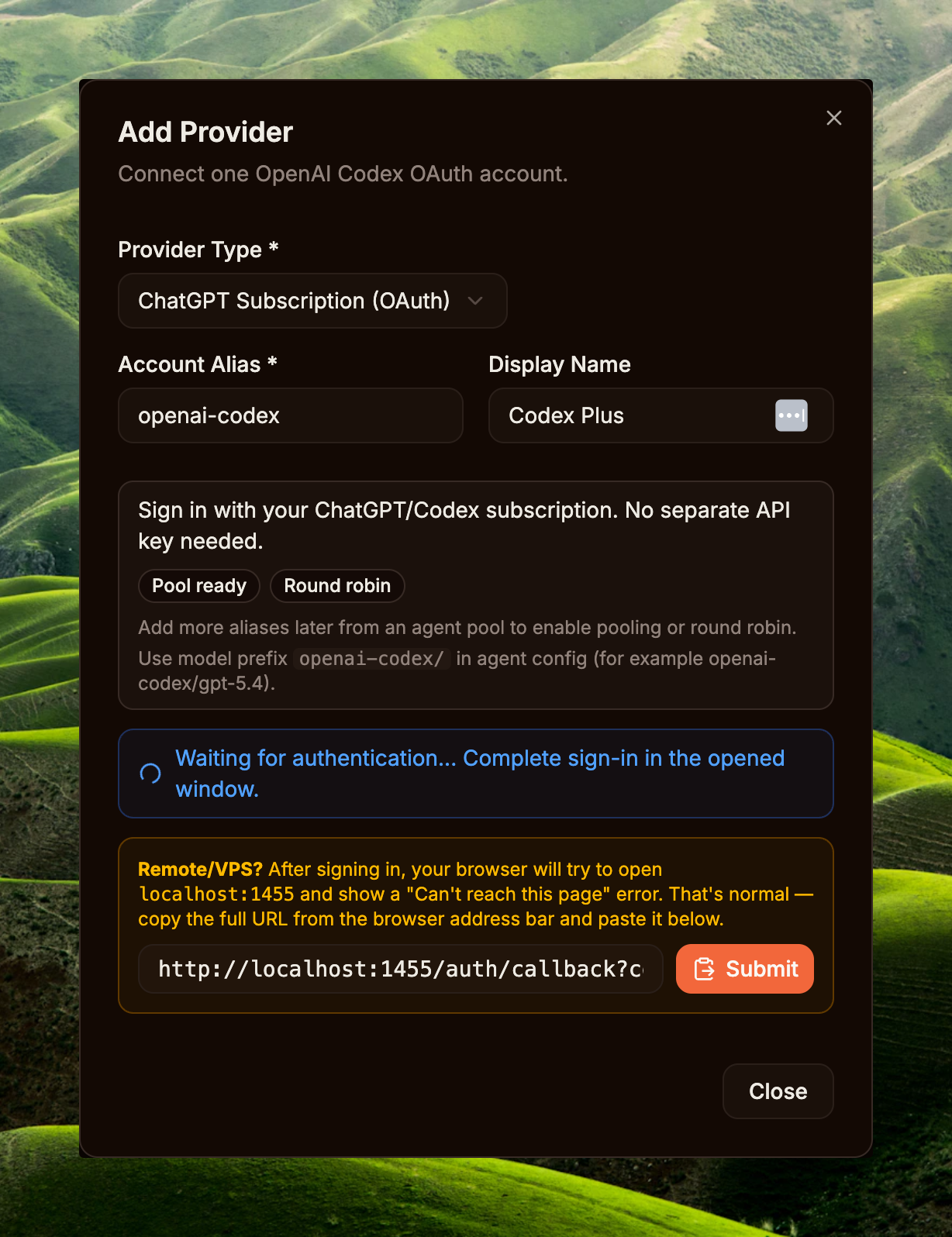
Sidebar → System / Providers → Add Provider. In the Add Provider modal pick ChatGPT Subscription (OAuth), keep or edit the Account Alias (e.g. openai-codex), enter a Display Name if needed, then click Connect OpenAI Account. The system opens a new OAuth tab for signing in to ChatGPT (Plus / Pro / Team / Enterprise — all work) and granting access.
After sign-in, the browser is redirected to a callback like http://localhost:1455/auth/callback?code=...&state=.... If you're on a remote/VPS host and the browser can't reach localhost, copy the full address bar URL, paste it into the callback field in the modal, then click Submit. When the Providers list shows the new provider with status Connected, you're done.
Step 2a — Enable + configure create_image
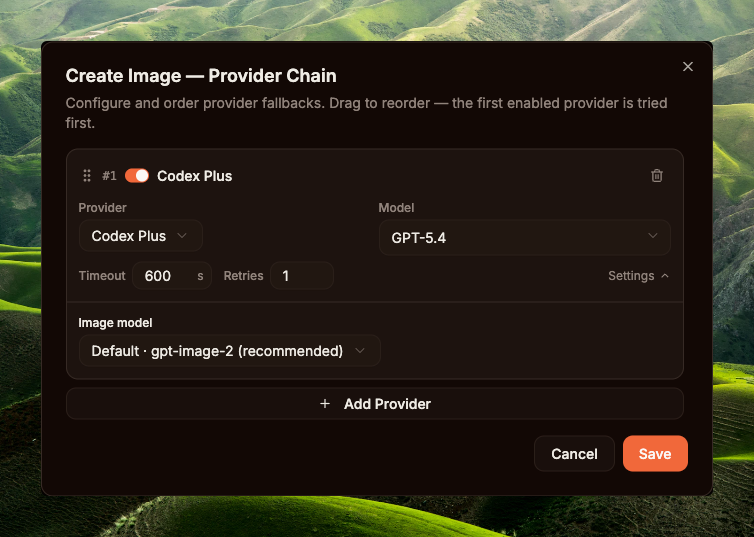
Sidebar → System / Builtin Tools (route /builtin-tools) → tab Media → Create Image. The Enabled flag defaults to OFF (see seed data at cmd/gateway_builtin_tools.go:55) — toggle it ON first; it's the master switch for the whole tenant. Then click Configure to open the Provider Chain modal.
The Create Image — Provider Chain modal lets you order fallback providers; the first enabled entry is tried first. Minimum setup: add one Codex Plus entry, model GPT-5.4, Timeout 600s (image gen can run long for complex prompts), Retries 1, and most importantly — pick Default · gpt-image-2 (recommended) for Image model. Hit Save. Click Add Provider if you want a fallback (e.g. OpenAI API key) for graceful degradation when OAuth quota runs out.
create_image — Codex Plus + GPT-5.4 + gpt-image-2Step 2b — Enable + configure read_image (optional)
Skip this if the agent's main model already has native vision (Qwen3.6-Plus, etc.) — the runtime falls back to inline mode, attaching the image bytes to the message for the LLM to read. Configure this if you use a text-only model or want to separate the vision provider from the reasoning model to optimise cost/latency.
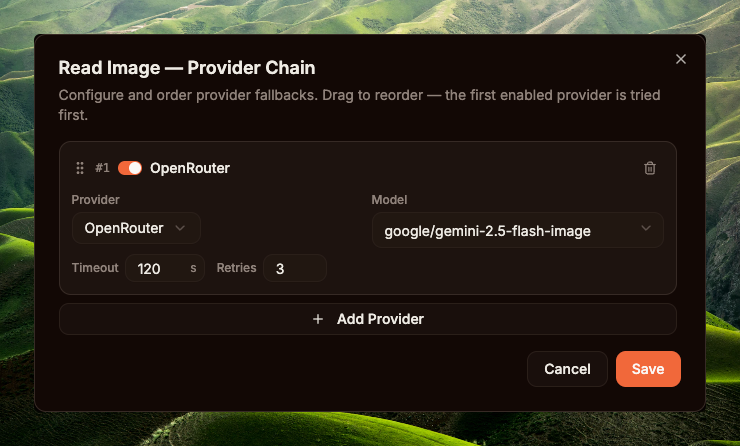
Same page /builtin-tools → tab Media → Read Image. Toggle Enabled ON (default OFF). Note the req badge next to the tool name — short for "requires", the tool's dependency. Hover to see the vision_provider requirement: you need at least one vision-capable provider registered in Step 1 (e.g. Gemini, OpenAI, Anthropic, OpenRouter, dashscope qwen-vl) for the toggle to make sense — otherwise the tool throws "No vision provider configured" at runtime.
Once enabled, click Configure → Read Image — Provider Chain modal. Example setup from the screenshot: one OpenRouter entry, model google/gemini-2.5-flash-image, Timeout 120s (vision calls are usually quick — no need for 600s like image gen), Retries 3 (vision calls are cheap; retrying is safe if the provider is flaky). This is a SEPARATE chain for read_image, not shared with create_image.
read_image chain is configured, every read_image call goes through it — even when the agent's main model has native vision. If no chain is configured, the image is attached inline to the message for the LLM to read directly (only works if the model supports vision). Code: internal/agent/media_tool_routing.go.
read_image — OpenRouter + google/gemini-2.5-flash-image, Timeout 120s, Retries 3create_image needs an image-gen model (gpt-image-2, DALL-E 3, ...). read_image needs a vision model (Gemini 2.5 Flash, GPT-4o-mini, ...). Different model classes, different providers, different billing, different latency/retry profiles (image gen takes 4–8 minutes — retries are expensive; vision calls take seconds — retries are cheap) — so GoClaw stores them as two separate chains in builtin_tools.settings (see internal/tools/media_provider_chain.go:64-100). Enable and configure each tool independently.
Step 3 — Create the Agent
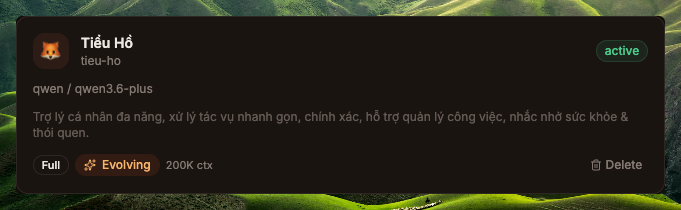
Sidebar → Core / Agents → New Agent. Minimum fields: Name, Provider, Model (e.g. Tiểu Hổ + qwen3.6-plus, or any model smart enough to read images and run the skill). Save → the agent appears in the list. This agent's job is to do reasoning: analyse the brief, read images, search the corpus, refactor the prompt, then call create_image.
tieu-ho after creation — provider qwen, model qwen3.6-plusStep 4 — Upload the gpt-image-2-pro-max skill
Clone and zip the skill from upstream:
macOS / Linux · bashgit clone https://github.com/therichardngai-code/gpt-image-2-pro-max /tmp/g2pm
cd /tmp/g2pm/.claude/skills/gpt-image-2-pro-max
zip -r ~/Desktop/gpt-image-2-pro-max.zip .git clone https://github.com/therichardngai-code/gpt-image-2-pro-max $env:TEMP\g2pm
Set-Location $env:TEMP\g2pm\.claude\skills\gpt-image-2-pro-max
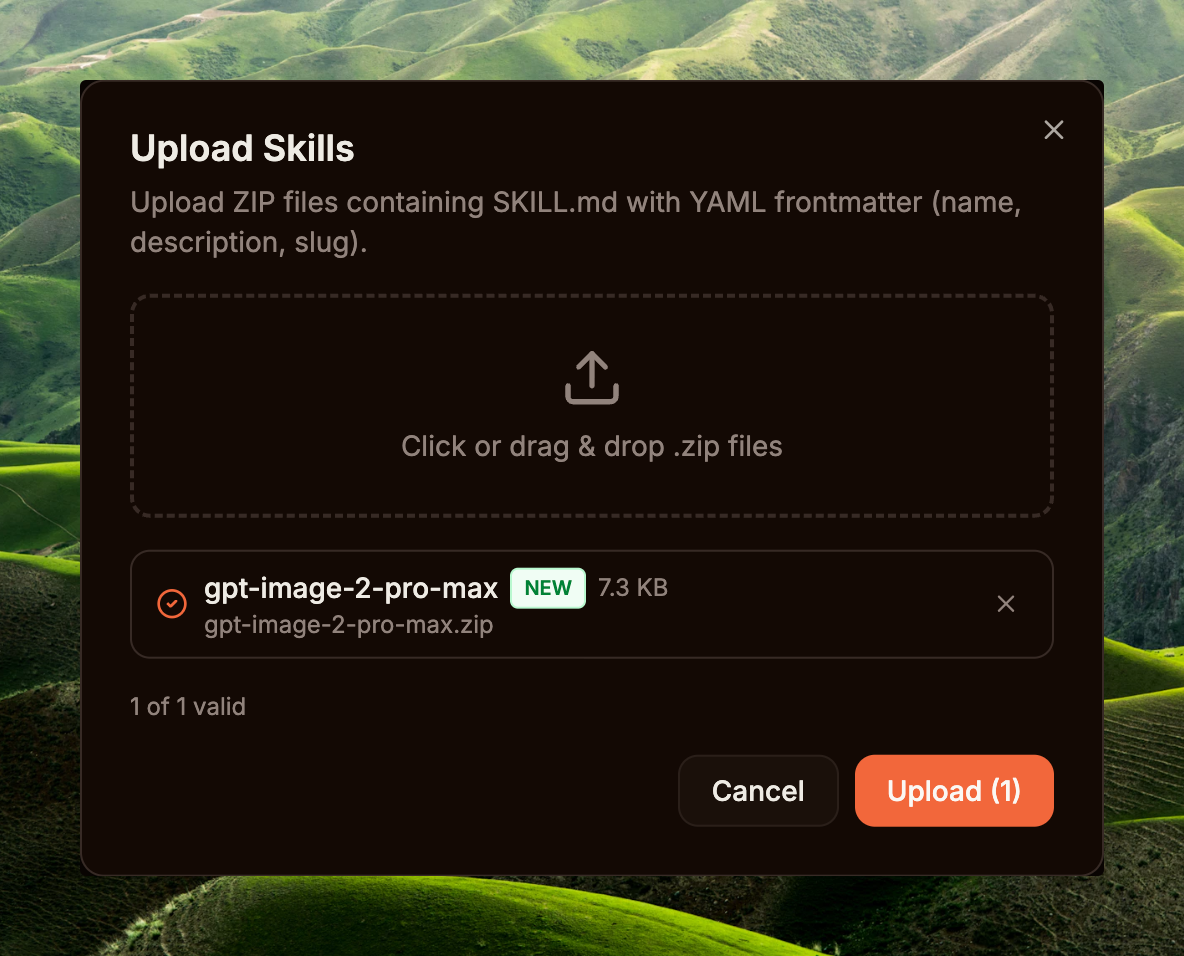
Compress-Archive -Path * -DestinationPath $HOME\Desktop\gpt-image-2-pro-max.zip -ForceSidebar → Capabilities / Skills → Upload Skill → drop the zip → the Dashboard parses the SKILL.md frontmatter, pulls name + description, then saves the skill record to the DB (version is an integer the DB auto-assigns and increments on each upload — not taken from frontmatter). The skill shows up in the list with an Enabled toggle.
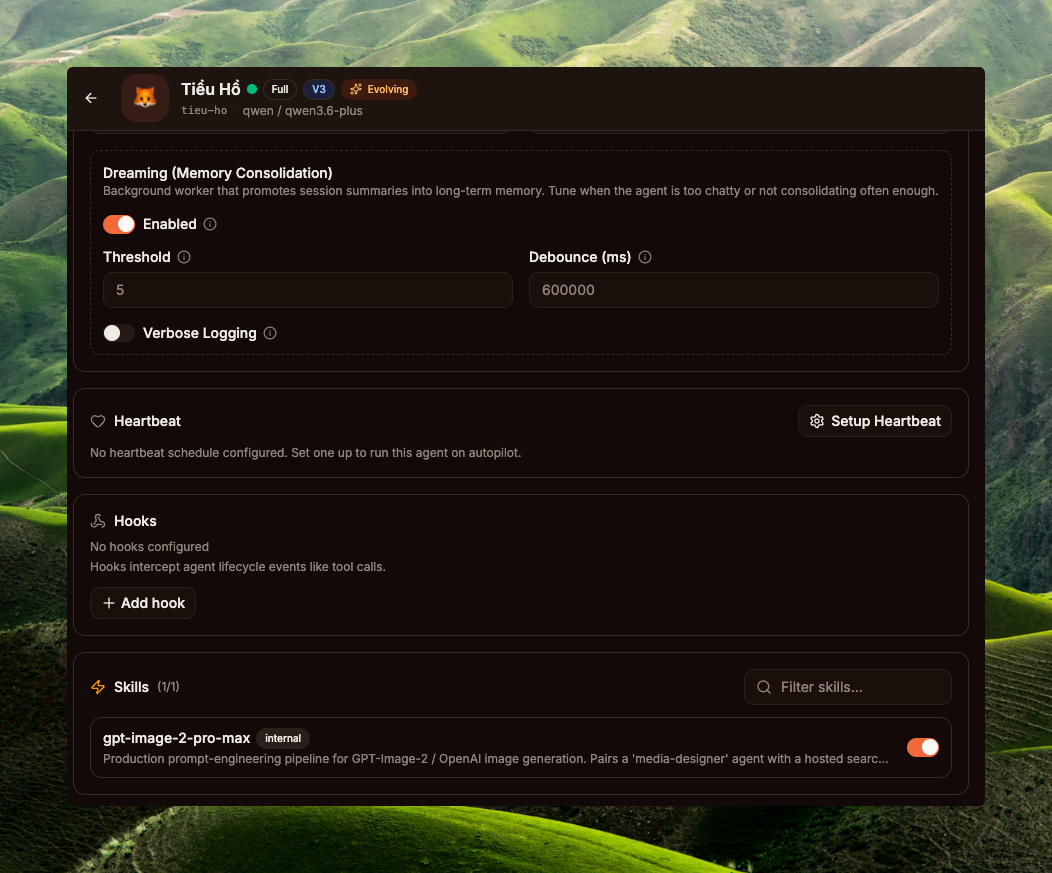
Finally, grant the skill to the agent you just created: open Agent detail → Skills → toggle gpt-image-2-pro-max to granted. The loader injects SKILL.md into the agent's system prompt from the next turn — no restart needed. This skill is a prompt-engineering pipeline — it teaches the agent how to diagnose the brief, search the 3,238-prompt corpus, pick a mood-appropriate template, refactor and resolve slots, and only then call create_image with a polished prompt.
tieu-ho (qwen3.6-plus) — grant toggle for gpt-image-2-pro-max ONcreate_image) into one Agent Team: the orchestrator holds the long context, the worker stays lightweight for rendering, and audit/trace are cleanly separated through the team task board. Create the team at Sidebar → Core / Teams → add both agents as members; the runtime switches the agent to ModeTeam (internal/agent/orchestration_mode.go) — full team tasks + delegate + spawn tools become available. But it is NOT required by the runtime — a single agent is enough to run the full workflow.
Tracing one turn (post-setup)
User brief: "Tet peak-season poster with a Vietnamese red fox, infographic style"
Detailed visual trace from a real run: PR #1002 · UX trace.
08Workflow: generating an image in GoClaw
"GoClaw users — generate images with GPT Image 2 in a single prompt. Upload a base image → the agent refines the prompt → image is generated right inside GoClaw.
P.S. I set up a main model on Qwen3.6-Plus (+read_image) and GPT_Image_2 (create_image)." — the author (Richard Ng)
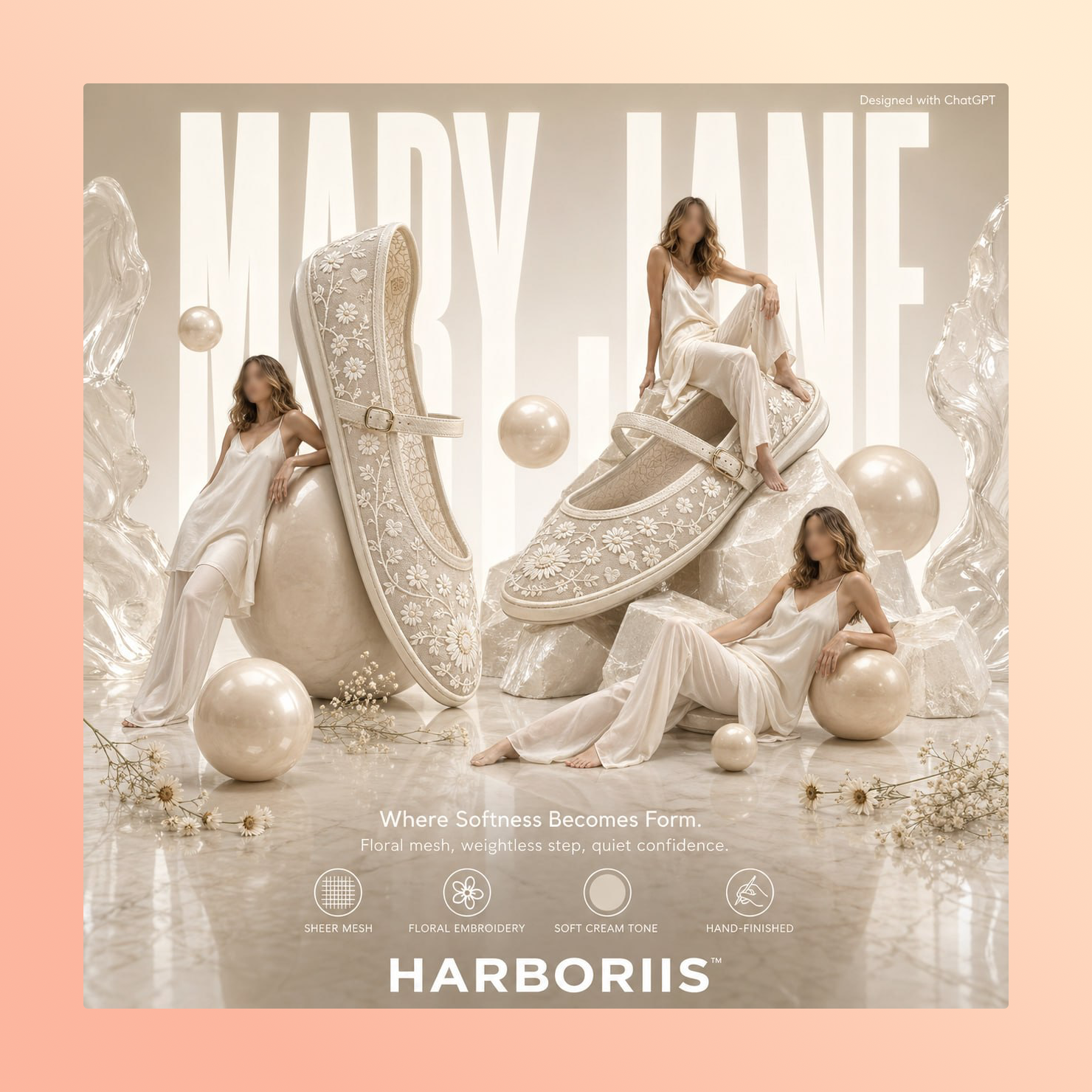
This is the workflow shared by the author himself: just upload the source image + type a few keywords (e.g. "make an ecommerce ad poster"). The agent does the rest — one upload is all it takes.
Minimum setup in GoClaw
tieu-ho (Tiểu Hổ) · qwen3.6-plus · with the gpt-image-2-pro-max skill granted. This is the only agent the user talks to. It runs reasoning (analyse the brief, search the corpus, refactor the prompt) and calls create_image directly. Qwen3.6-Plus has native vision so it reads uploaded images directly — no need to configure the read_image tool.create_imageA builtin tool — the runtime attaches it to the tool list whenever the tenant has enabled the toggle at /builtin-tools (Step 2a, Section 07) and the agent has AllowImageGeneration=true (default). Provider Chain → Codex Plus + gpt-image-2 renders the PNG. The agent's main model (Qwen3.6-Plus) only handles reasoning and is unrelated to the image-gen model — the runtime routes media tools through their own chain. The read_image tool (Step 2b) only needs to be configured if the agent's main model is text-only (no vision capability).Workflow: brief → finished image
create_image call. The GoClaw runtime supports both — no hard gate on create_image, every decision lives in the agent's reasoning.
"make an ecommerce ad poster"09Best practices
The two most important tips when running this combo:
- The more specific the brief, the more accurate the search. When the user types only "red fox", the agent searches for
"red fox"and gets back all kinds of unrelated templates (forest fox, cartoon fox, realistic fox, etc.). Add keywords for shape (poster / infographic / portrait / ad…), mood (festive / moody / minimal…), and palette (red-gold / pastel / neon…) and the search snaps to your intent. Example: "Tet poster, Vietnamese red fox, infographic style, festive red-gold palette" → the agent's search query carriesinfographic festive red-gold, enough to filter to the right templates. - Don't drop the timeout below 600s. Generating complex images (e.g. an infographic with lots of in-image text) typically takes 4–8 minutes server-side — that's not an error, that's realistic. The old default of
120s × 2 retriesoften got cut off mid-flight (context deadline exceeded) and ruined the run. PR #1002 changes it to600s × 1 retry: wait longer, give the server enough time; one retry only, because retrying after a timeout doubles your cost and rarely succeeds. Operators can override if they need to, but don't go below 600s — you'll almost certainly hit the old failure mode again.
10Technical summary
File references
| Component | File | Role |
|---|---|---|
| Native image interface | internal/providers/native_image.go | The NativeImageProvider interface, ValidateImageModel, SizeFromAspect |
| Codex implementation | internal/providers/codex_native_image.go | Build the body, parse JSON / SSE responses |
| Tool entry | internal/tools/create_image.go | Tool dispatch, chain resolution, native path |
| Provider chain | internal/tools/media_provider_chain.go | Chain timeout 600s, max_retries 1 default |
| PNG embed (runtime) | internal/tools/png_embed.go | pngEmbedPrompt — inserts a "Description" tEXt chunk before IEND |
| PNG embed (2-chunk) | internal/agent/png_metadata.go | EmbedPNGPrompt writes 2 chunks (Description + Software) — not yet called by create_image |
| Tool filter gate | internal/agent/loop_tool_filter.go | 2-tier gate: capability AND allowImageGeneration |
| Vision routing | internal/agent/media_tool_routing.go | hasReadImageProvider — file-ref vs inline mode for uploaded images |
| Orchestration mode | internal/agent/orchestration_mode.go | ModeTeam / ModeDelegate / ModeSpawn resolved from team + agent links |
| Builtin tool seed | cmd/gateway_builtin_tools.go | Default Enabled: false + Requires dependencies (vision, image_gen, ...) |
Skill backend
The skill is uploaded via the Dashboard (see Section 07 · Step 4). scripts/search.py calls an external corpus host; BM25 + tag-boost ranking lives on the server, not in GoClaw core.