通过 Codex OAuth 使用 GPT Image 2 进行原生图像生成
ChatGPT 订阅(Plus / Pro / Team / Enterprise)已将 gpt-image-2 纳入配额 — Plus 有充裕的限额,Pro 限额最高并享有优先处理。
PR #1002 将 GoClaw 的 create_image 工具通过 Codex OAuth 接入原生管道。这里的 Codex 是 GoClaw 用于调用 OpenAI Responses API 的 OAuth 流程,无需 API key。
gpt-image-2-pro-max skill 由 GoClaw 贡献者 Richard Ng 开源,采用 MIT 许可,按 Claude Code Skill 规范打包,兼容 GoClaw 的 Skill 系统。只需将 skill 目录打包为 zip,通过 Dashboard 上传,agent 即可使用。3,000+ 个 prompt 模板语料库归属 Twitter/X 创作者;skill 仅对其建立索引以加速检索。将 PR #1002 与本 skill 结合,agent 可读取 skill、自主构思 prompt,然后调用 create_image,通过 ChatGPT 订阅配额生成海报图像,无需额外的 API Usage 费用。
01PR #1002 之前的问题
旧版 create_image 只能配合 API key 使用
在 PR #1002 之前,GoClaw 的 create_image 工具通过 credentialProvider 接口查找 provider — 即 provider 必须暴露 APIKey() string 和 APIBase() string 两个方法。CodexProvider 使用 OAuth 流程,因此有意不实现这两个方法:token 通过 refresh_token grant 轮换(参见 internal/oauth/token.go),而默认后端 URL https://chatgpt.com/backend-api(常量 DefaultProviderAPIBase)仅供内部使用 — 不在 tool 层允许访问的 credential surface 范围内。
后果:ChatGPT Plus/Pro 订阅的配额中包含 gpt-image-2 — 可在 chatgpt.com/images 网页端使用,也可在 Codex CLI 中调用,但 GoClaw agent 无法调用,因为 create_image 在 APIKey()/APIBase() 检查步骤被拦截。用户不得不走并行的 API key 路径。最常用的是通过 OpenRouter 使用 Gemini Nano Banana 2,原因如下:
- 对大多数场景(海报、缩略图、插图)质量稳定。
- OpenRouter 允许用单一 key 访问多个图像生成模型,无需分别管理 OpenAI / Google API key。
- 按图计费,不产生第二个订阅。
GoClaw 默认的 imageGenModelDefaults 链将每个 provider 映射到一个模型:openai → gpt-image-1.5、openrouter → google/gemini-2.5-flash-image(Nano Banana 2)、gemini → gemini-2.5-flash-image、minimax → image-01、dashscope → wan2.6-image、byteplus → seedream-5-0-260128。Provider 优先级顺序为 openrouter → gemini → openai → minimax → dashscope → byteplus。所有这些都需要对应的 API key。
问题在于:用户每月已付费 ChatGPT Plus/Pro 用于编码工作流,gpt-image-2 是高质量图像生成模型之一 — 但这部分配额一直闲置,无法在 agent 中使用。
| PR #1002 之前 | PR #1002 之后 |
|---|---|
唯一路径:API key(需要 APIKey() + APIBase()) | 通过 OAuth token 的原生路径新增(API key 路径仍保留,供 openai、gemini、openrouter 等使用) |
gpt-image-1.5 经 openai provider + OPENAI_API_KEY(调用 api.openai.com/v1/chat/completions);Nano Banana 2 经 OpenRouter | gpt-image-2(默认)+ gpt-image-1.5(遗留)经 Codex OAuth,调用 chatgpt.com/backend-api/codex/responses;消耗订阅配额 |
| 按图计费 | 已通过订阅付费 |
| 超时 120s × 2 次重试 | 超时 600s × 1 次重试 |
| 无 prompt 溯源 | 嵌入 PNG tEXt chunk |
| 1 层门控(provider 是否有凭据?) | 2 层(capability + agent 配置) |
Prompt 工程碎片化
gpt-image-2 社区在 X/Twitter 上分享 prompt 模板,但较为零散。EvoLinkAI 维护了 awesome-gpt-image-2-prompts 仓库(约 370 个案例),但数据以 README + tweet 链接的形式存放,没有搜索引擎。Agent 想要利用这些资源,只能手动阅读和过滤。
02OAuth 原生图像架构
PR #1002 在 internal/providers/native_image.go 中引入了新接口。端到端处理流程如下图所示:
实际代码包含一个简洁的接口:
type NativeImageProvider interface {
    GenerateImage(ctx context.Context, req NativeImageRequest) (*NativeImageResult, error)
}
create_image 工具通过 MediaProviderChain 查找 provider。当链条条目为 Codex OAuth 时,原始 provider 对象被注入 params["_native_provider"]。在 callProvider 中:
if rawProvider, ok := params["_native_provider"]; ok {
    if np, ok := rawProvider.(providers.NativeImageProvider); ok {
        // 原生路径 — 无需 APIKey/APIBase
        return np.GenerateImage(ctx, ...)
    }
}
if cp == nil {
    return error("provider does not expose API credentials")
}
// 凭据路径:openai、gemini、minimax、dashscope、byteplus、openrouter
原生检查在 cp == nil guard 之前运行。OAuth provider 有意不公开凭据;若调换顺序,请求会以误导性错误失败 —— 用户看到"缺少凭据"便去配置凭据,而真正的原因是原生路径错了。
2 层门控
image_generation 工具仅在满足以下两个条件时才附加到请求中:
- Provider capability:provider 实现了
CapabilitiesAware且Capabilities().ImageGeneration == true。Codex provider 硬编码为true,因为 OpenAI Responses API 支持image_generation工具。 - Agent 配置:
AgentConfig中的AllowImageGeneration字段,默认为true。管理员可设置other_config.allow_image_generation: false来禁止图像生成。
loop_tool_filter.go::buildFilteredTools 中的逻辑:
if l.allowImageGeneration {
    if aware, ok := l.provider.(providers.CapabilitiesAware); ok {
        if aware.Capabilities().ImageGeneration {
            toolDefs = append(toolDefs, imageGenToolDef)
        }
    }
}
imageGenToolDef 只是一个标志 {Type: "image_generation"} — 没有 name,也没有 parameters schema。对于普通的 function calling,客户端必须提供完整定义(例如 {type: "function", function: {name, description, parameters}})以便 LLM 知道如何传参。而这里的 image_generation 是 Codex Responses API 的内置工具 — 服务端自动附加 schema 并运行处理器,客户端只需用哨兵值将其开启。
03Codex Responses API 线格式
Endpoint:POST {apiBase}/codex/responses
map[string]any{
    "model":        "gpt-5.4",  // 父级 LLM,非图像模型
    "stream":       true,        // 必填 — false 会被 HTTP 400 拒绝
    "store":        false,
    "instructions": "Generate an image matching the user's description using the image_generation tool. Return only the image; do not describe it in text.",
    "input":        []any{...user message...},
    "tools": []map[string]any{{
        "type":          "image_generation",
        "action":        "generate",
        "model":         "gpt-image-2",   // 图像模型在这里指定
        "output_format": "png",
        "size":          "1024x1024",
    }},
    "tool_choice": map[string]any{"type": "image_generation"},  // 强制工具调用
}
注意事项:
stream: true必填 — 非流式请求会被以Stream must be set to true拒绝。instructions必须有非空且明确的值。留空 → 模型可能返回描述性文本而不是调用工具。tool_choice必须强制指定image_generation,否则模型可能跳过工具调用。- 同一请求中有两个模型:
model(父级 — gpt-5.4)和tools[0].model(图像 — gpt-image-2)。混淆两者 → API 报出模糊错误。
解析响应
由于 stream:true 是必填的,主路径是 SSE 流。端到端流程:
代码仍保留了非流式 JSON 解析的回退路径。如果服务端意外返回原始 JSON 对象(而非 data: 行),parseNativeImageResponse 会遍历 output[],查找 type == "image_generation_call",然后 base64 解码 result。无法通过设置 stream:false 触发此路径,因为请求会先被 400 拒绝。
SSE 路径:扫描 data: 行,优先处理 2 个事件:
response.output_item.done— 图像项就绪,取event.Item.Result(base64)+OutputFormat。response.completed— 最终 usage token,若尚未找到 item,则再次遍历event.Response.Output[]。
for line := range bytes.SplitSeq(data, []byte("\n")) {
    if !bytes.HasPrefix(line, []byte("data: ")) { continue }
    payload := line[len("data: "):]
    if bytes.Equal(payload, []byte("[DONE]")) { break }
    // ... 反序列化事件,switch event.Type
}04模型白名单 + 链配置
服务端白名单
var allowedImageModels = map[string]bool{
    "gpt-image-2":   true, // 默认 — 最新质量
    "gpt-image-1.5": true, // 遗留回退
}
ValidateImageModel 在 provider 层直接拒绝其他值(例如 dall-e-3),不让上游悄无声息地拒绝。用户通过链条条目参数 image_model 选择模型;该值被传入 NativeImageRequest.ImageModel,经过验证后附加到 Responses API 请求的 tools[0].model 中。
gpt-image-1.5 的说明: PR #1002 之前,gpt-image-1.5 是 provider openai 的默认模型(imageGenModelDefaults["openai"] = "gpt-image-1.5")— 走 API key 路径,使用 OPENAI_API_KEY 调用 api.openai.com/v1/chat/completions。PR #1002 之后,该模型作为遗留回退保留在原生路径白名单中 — agent 可按需通过 Codex OAuth 选用。PR 新增了路径,不淘汰旧模型;两个模型均可走原生路径,默认为 gpt-image-2。
链配置
MediaProviderChainEntry 默认值:
Timeout    int  // 秒,默认 600(10 分钟 — 图像/视频生成较慢)
MaxRetries int  // 默认 1(图像生成重试很少成功)
超时时间从 120s 提升至 600s,因为 gpt-image-2 实际可能需要 30–180s。若超时中断,上游请求可能仍在运行,因此重试通常无济于事。为此 MaxRetries 从 2 降至 1,让错误更早暴露,而不是被重试循环掩盖。
UI 使用 ui/web/src/pages/builtin-tools/media-provider-params-schema.ts 中的 schema 渲染配置表单,管理员可按租户和工具进行精细调整。
05Provenance:PNG tEXt chunk + 标题 UI
create_image 保存文件时,pngEmbedPrompt 会重写 PNG 字节流,并在 IEND 之前插入一个 tEXt chunk Description。该函数位于 tools/png_embed.go,以避免 tools→agent 的导入循环:
Description = <用户发送的 prompt>PNG tEXt chunk 的标准格式及其在字节流中的插入位置:
agent.EmbedPNGPrompt 模块还会额外写入 Software = goclaw chunk,但 create_image 路径目前不调用该模块 — 只嵌入 Description。
若输入缺少 PNG 签名(8 字节魔数)或找不到 IEND chunk,函数会自动跳过。失败模式:原样返回旧字节,不报错。
效果:原始 prompt 随下载文件一同传递。可通过 exiftool image.png(字段 Description)或 PNG 元数据查看器读取。审计、复现相似图像、调试 prompt 都更加便捷。
UI 在 MediaGallery 图片下方渲染标题:静默斜体,限制 2 行,鼠标悬停时弹出 tooltip 显示完整 prompt。文件保存路径为:{workspace}/generated/{YYYY-MM-DD}/image_{hint}_{timestamp}.png。
06Skill gpt-image-2-pro-max:通过 Skill 系统的 prompt 注册表
gpt-image-2-pro-max skill 由 GoClaw 贡献者 Richard Ng 开源,采用 MIT 许可。语料库中 3,000+ 个 prompt 模板归属 Twitter/X 创作者;skill 仅对其建立索引以加速检索,每次返回 prompt 时均注明原作者,语料库也对 EvoLinkAI/awesome-gpt-image-2-prompts 仓库进行了上游致谢。Skill 按 Claude Code skill 规范打包;GoClaw 的 Skill 系统兼容该规范,因此同一个 skill 目录在两者上均可运行。
结构剖析
语料库:3,238 个经社区验证的 prompt,托管于 https://gpt-image-2-prompts.goclawoffice.com。标签通过 10 个维度推断:subjects、styles、lighting、cameras、moods、palettes、compositions、mediums、techniques、usecases。每条记录包含 prompt 正文、Twitter/X 归属信息和参考图像。Endpoint 按 IP 限速,对合理使用友好。
Agent 调用的 CLI 接口:
python scripts/search.py "luxury shoe ecommerce ad cream pastel" -n 5
python scripts/search.py "perfume bottle" --shape ecommerce -n 3
python scripts/search.py "neon ui" --persist plans/neon-refs.md
第一个查询的示例输出(精简为 3 条命中,截断 prompt 正文):
#1  bm25=-10.76  shape=ecommerce  source=None
  id    : 64dp29km
  title : E-commerce Main Image - Luxury Perfume Ad on Marble Vanity
  author: @MiguelMaestroIA
  tweet : https://x.com/MiguelMaestroIA/status/2047555836252151831
  image : https://gpt-image-2-prompts.goclawoffice.com/img/64dp29km_0
  imgid : 64dp29km_0
  tags  : cameras=1-1 | compositions=negative-space | moods=dreamy,edgy,elegant,intense,luxurious,minimal | palettes=crimson-burgundy,duotone,monochrome | styles=cinematic,editorial | subjects=product | techniques=parameterised-template,text-overlay-explicit | usecases=ecommerce-main-image,poster-flyer
  prompt:
    A luxury cosmetics advertisement poster featuring a single upright {argument name="product type" default="lipstick"} centered on a glossy black cube pedestal against a rich monochrome {argument name="background color" default="deep crimson red"} studio background. The product is a bold satin-finish {argument name="product shade" default="true red"} lipstick with the bullet fully extended, dramatic...

#2  bm25=-9.85  shape=  source=None
  id    : z9q36mnc
  title : Futuristic Bionic Super Shoe
  author: @Ericool 🇲🇾
  tweet : https://x.com/EricoolWong/status/2048353098897453286
  image : https://gpt-image-2-prompts.goclawoffice.com/img/z9q36mnc_0
  imgid : z9q36mnc_0
  tags  : cameras=low-angle | moods=energetic,futuristic,intense,luxurious | palettes=gold-black | styles=cinematic | subjects=fashion-item,product | techniques=parameterised-template
  prompt:
    Extreme futuristic {argument name="subject" default="cheetah bionic super shoe"}, hybrid of supercar and running sneaker, aggressive mechanical structure, layered carbon fiber, glowing energy core, dynamic speed trails, {argument name="colors" default="black gold"} luxury finish, dramatic low angle, cinematic lighting, high-end sports ad, ultra detailed, 8k

#3  bm25=-9.82  shape=ecommerce  source=None
  id    : 0zjvnji7
  title : Vitamin C Skincare Ad
  author: @Gem Alpha
  tweet : https://x.com/Gemalpha_88/status/2046796479562678589
  image : https://gpt-image-2-prompts.goclawoffice.com/img/0zjvnji7_0
  imgid : 0zjvnji7_0
  tags  : cameras=1-1 | moods=dreamy,edgy,elegant,luxurious,minimal,warm-emotional | palettes=earth-tones | styles=photorealistic | subjects=abstract,product | techniques=aspect-explicit,parameterised-template
  prompt:
    Create a clean luxury skincare product advertisement in a square 1:1 layout with a warm beige studio background and strong natural sunlight casting soft palm-leaf shadows across the wall. Place 1 amber glass dropper bottle on the left-center, standing upright on a round cream stone pedestal. The bottle has a glossy gold collar and a matte white rubber dropper top. Add a white rectangular label wit...

(共 3 条匹配,显示 3 条)
输出按 BM25 排序,包含 prompt_body、tags.{moods,palettes,subjects,...}、author、tweet、image。主要过滤参数:--shape、--has-image、-n、--full、--persist。
07通过 Web Dashboard 配置
GoClaw 的 Web Dashboard 侧边栏按 Core / Capabilities / System 分组。本次配置需要 4 个模块:Agents(Core)、Skills(Capabilities)、Providers + Builtin Tools(System)。最简配置只需 1 个 agent — 所有 agent 均可通过 Step 2a 的全局 Provider Chain 使用 create_image 工具(Step 2b 配置 read_image 为可选,具有原生 vision 能力的模型可跳过)。
Step 1 — 连接 Codex provider
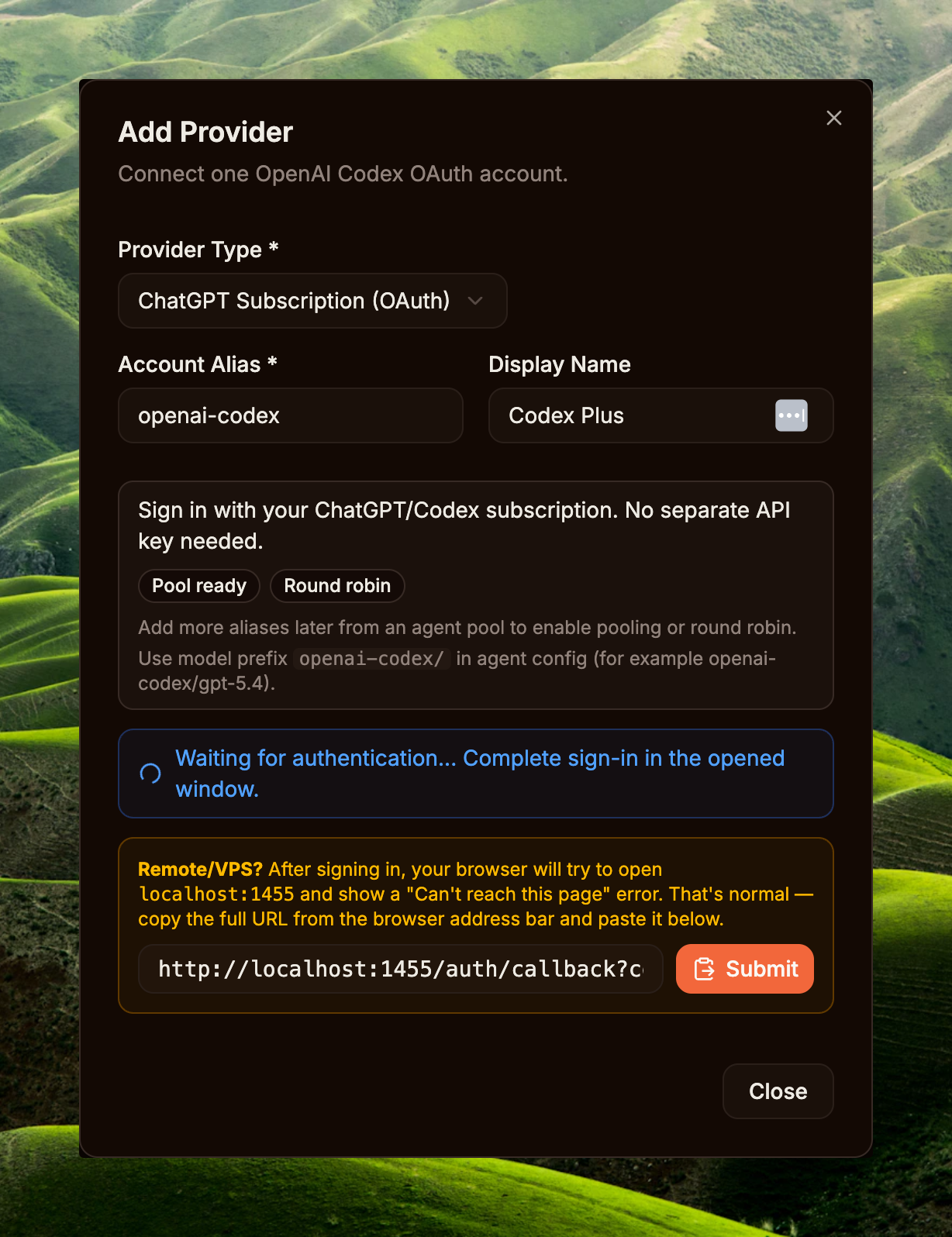
侧边栏 → System / Providers → Add Provider 按钮。在 Add Provider 弹窗中,选择 ChatGPT Subscription (OAuth),保留或修改 Account Alias(例如 openai-codex),按需填写 Display Name,然后点击 Connect OpenAI Account。系统将打开新的 OAuth 标签页,登录 ChatGPT 账户(Plus / Pro / Team / Enterprise 均可)并授权。
登录完成后,浏览器会重定向到形如 http://localhost:1455/auth/callback?code=...&state=... 的回调地址。若在远程服务器 / VPS 上运行且浏览器提示无法访问 localhost,请复制地址栏中的完整 URL,粘贴到弹窗的 callback 输入框,再点击 Submit。当 Providers 列表显示新 provider 状态为 Connected 即完成。
Step 2a — 启用并配置 create_image
侧边栏 → System / Builtin Tools(路由 /builtin-tools)→ Media 标签 → Create Image 项。Enabled 开关默认为 OFF(参见 cmd/gateway_builtin_tools.go:55 中的种子数据)— 先将右侧开关拨为 ON,这是整个租户的总开关。然后点击 Configure 进入 Provider Chain 弹窗。
Create Image — Provider Chain 弹窗可对 fallback provider 排序;第一个 enabled 的 provider 优先尝试。最简配置:添加 1 条 Codex Plus 条目,模型选 GPT-5.4,Timeout 设为 600s(prompt 复杂时图像生成可能耗时较长),Retries 设为 1,最关键的是 — Image model 选择 Default · gpt-image-2 (recommended)。点击 Save。如需在 OAuth 配额耗尽时优雅降级,可点击 Add Provider 添加 fallback(例如 OpenAI API key)。
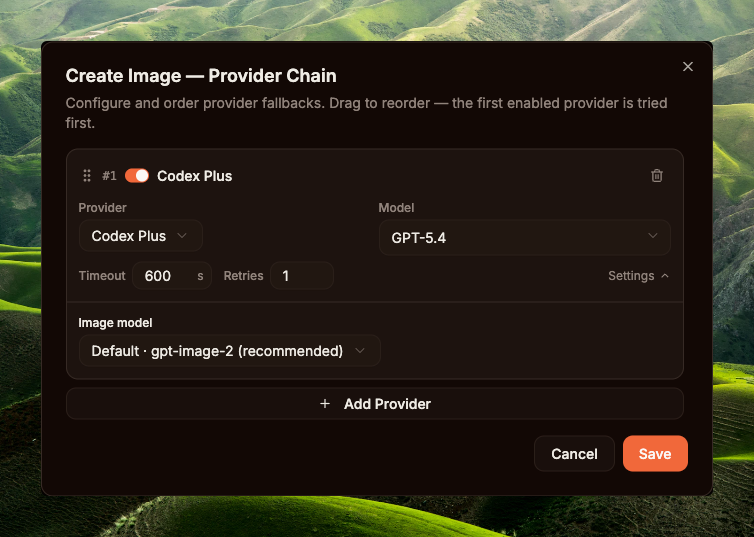
create_image 的 Provider Chain — Codex Plus + GPT-5.4 + gpt-image-2Step 2b — 启用并配置 read_image (可选)
可跳过,若 agent 的主模型已具备原生 vision 能力(Qwen3.6-Plus 等)— 运行时会回退到内联模式,将图像二进制文件附加到消息中供 LLM 直接读取。需要配置,若使用纯文本模型,或希望将 vision provider 与推理模型分开以优化成本/延迟。
在同一 /builtin-tools 页面 → Media 标签 → Read Image 项。将 Enabled 开关拨为 ON(默认 OFF)。注意工具名称旁的 req 徽章 — 是 "requires" 的缩写,表示工具依赖。悬停可查看 vision_provider 要求:需要在 Step 1 中注册至少 1 个具备 vision 能力的 provider(如 Gemini、OpenAI、Anthropic、OpenRouter、dashscope qwen-vl),开关才有意义 — 否则运行时会抛出 "No vision provider configured" 错误。
启用后,点击 Configure → Read Image — Provider Chain 弹窗。截图中的示例配置:1 条 OpenRouter 条目,模型 google/gemini-2.5-flash-image,Timeout 120s(vision 调用通常较快,无需像图像生成那样设 600s),Retries 3(vision 调用成本低,provider 不稳定时重试安全)。这是 read_image 专属的链,不与 create_image 共用。
read_image 链后 → 所有 agent 调用 read_image 均会走此链,即使 agent 主模型具备原生 vision 能力。未配置链 → 图像以内联方式附加到消息供 LLM 直接读取(仅在模型具备 vision 时有效)。代码参见 internal/agent/media_tool_routing.go。
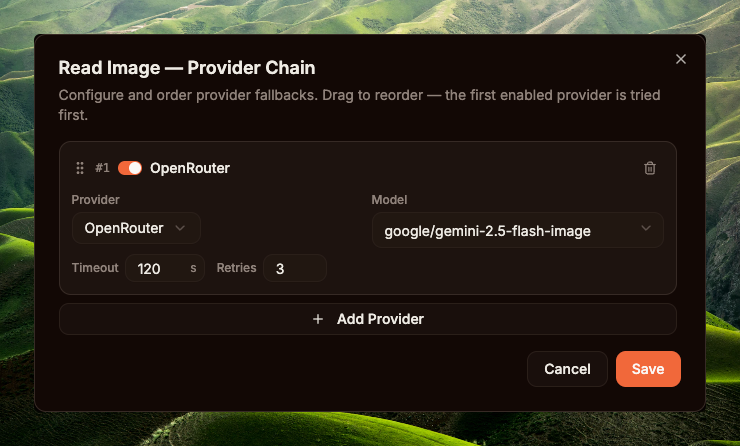
read_image 的 Provider Chain — OpenRouter + google/gemini-2.5-flash-image,Timeout 120s,Retries 3create_image 需要图像生成模型(gpt-image-2、DALL-E 3……),read_image 需要 vision 模型(Gemini 2.5 Flash、GPT-4o-mini……)。两类模型不同,provider 不同,计费方式不同,延迟/重试特性也不同(图像生成 4-8 分钟,重试成本高;vision 调用几秒,重试安全)— 因此 GoClaw 在 builtin_tools.settings 中分别存储两条链(参见 internal/tools/media_provider_chain.go)。各工具独立启用并配置。
Step 3 — 创建 Agent
侧边栏 → Core / Agents → New Agent。必填字段:Name、Provider、Model(例如 Tiểu Hổ + qwen3.6-plus,或任何具备足够智能来读取图像并运行 skill 的模型)。保存后 agent 出现在列表中。该 agent 的职责是执行推理:分析简报、读取图像、检索语料库、优化 prompt,然后调用 create_image 工具。
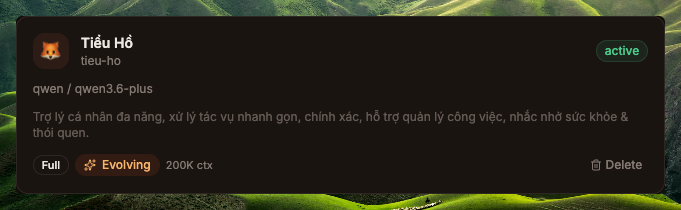
tieu-ho — provider qwen,模型 qwen3.6-plusStep 4 — 上传 skill gpt-image-2-pro-max
从上游 clone 并打包 skill:
macOS / Linux · bashgit clone https://github.com/therichardngai-code/gpt-image-2-pro-max /tmp/g2pm
cd /tmp/g2pm/.claude/skills/gpt-image-2-pro-max
zip -r ~/Desktop/gpt-image-2-pro-max.zip .git clone https://github.com/therichardngai-code/gpt-image-2-pro-max $env:TEMP\g2pm
Set-Location $env:TEMP\g2pm\.claude\skills\gpt-image-2-pro-max
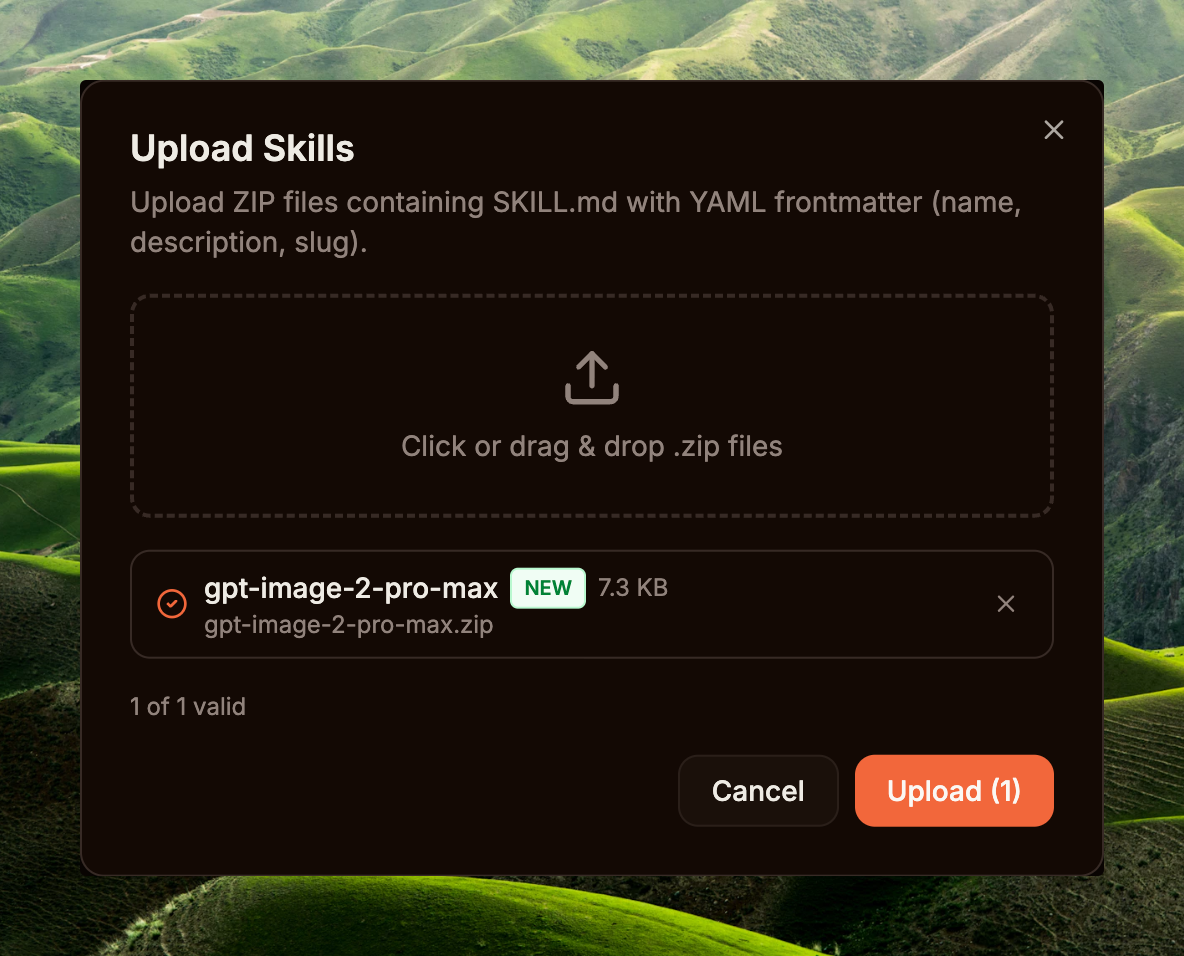
Compress-Archive -Path * -DestinationPath $HOME\Desktop\gpt-image-2-pro-max.zip -Force侧边栏 → Capabilities / Skills → Upload Skill → 拖入 zip 文件 → Dashboard 解析 SKILL.md frontmatter,提取 name + description,将 skill 记录存入数据库(版本号为数据库自动分配的整数,每次上传递增 — 不从 frontmatter 读取)。Skill 出现在列表中,附带 Enabled 开关。
最后,为刚创建的 agent 授权该 skill:打开 Agent detail → Skills 区块 → 将 gpt-image-2-pro-max 开关拨为 granted。从下一个 turn 起,Loader 会将 SKILL.md 注入 agent 的 system prompt,无需重启。该 skill 是一个 prompt 工程流水线 — 教 agent 如何诊断简报、在 3,238 个 prompt 模板语料库中检索、按情绪筛选模板、优化并填充参数槽,然后使用打磨后的 prompt 调用 create_image。
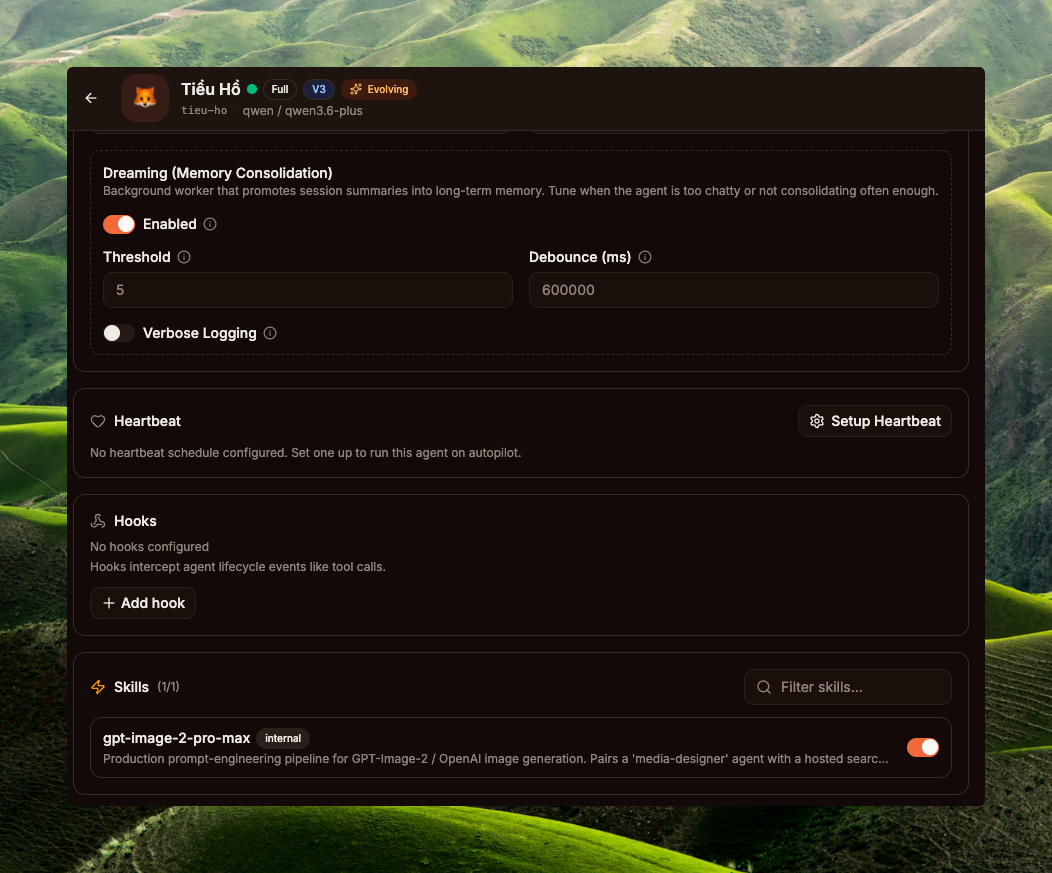
tieu-ho(qwen3.6-plus)— 开启 gpt-image-2-pro-max 授权开关create_image)组合到同一个 Agent Team:orchestrator 持有较长的上下文,worker 负责轻量渲染,审计/追踪通过团队任务看板清晰分离。在侧边栏 → Core / Teams 创建团队 → 将两个 agent 都添加为成员;运行时会将 agent 切换至 ModeTeam 模式(internal/agent/orchestration_mode.go)— 完整的团队任务、委托和 spawn 工具均可用。但从运行时角度而言并非必须 — 单个 agent 已足以运行完整工作流。
单轮追踪(配置完成后)
用户简报:"poster cao điểm Tết với cáo đỏ Việt Nam, style infographic"
来自真实运行的可视化追踪详情:PR #1002 · UX trace。
08工作流示例:在 GoClaw 中生成图像
"大家在 GoClaw 里只需一个 prompt 就能用 GPT Image 2 随意生成图像。上传底图 → Agent 优化 prompt → 直接在 GoClaw 中生成图像。
P.S. 我的配置:主模型 Qwen3.6-Plus(+read_image)和 GPT_Image_2(create_image)。" — 作者(Richard Ng)
这是作者本人分享的工作流:只需上传参考图像 + 输入几个描述关键词(例如:"tạo ảnh ads poster ecommerce")。Agent 自动完成其余工作 — 全程只需一次上传。
GoClaw 中的最简配置
tieu-ho(Tiểu Hổ)· qwen3.6-plus · 授权 skill gpt-image-2-pro-max。这是用户唯一交互的 agent。负责推理(分析简报、检索语料库、优化 prompt)并直接调用 create_image。Qwen3.6-Plus 已具备原生 vision 能力,可直接读取上传图像,无需配置 read_image 工具。create_image内置工具 — 当租户在 /builtin-tools 启用开关(Section 07 Step 2a)且 agent 的 AllowImageGeneration=true(默认)时,运行时自动将其加入工具列表。Provider Chain → Codex Plus + gpt-image-2 渲染 PNG。Agent 的主模型(Qwen3.6-Plus)只负责推理,与图像生成模型无关 — 运行时通过独立链路由媒体工具。read_image 工具(Step 2b)仅在 agent 主模型为纯文本模型(不具备 vision 能力)时才需要配置。工作流:简报 → 完整图像
create_image。GoClaw 运行时两者均支持 — create_image 无硬性门控,所有决策均由 agent 推理做出。
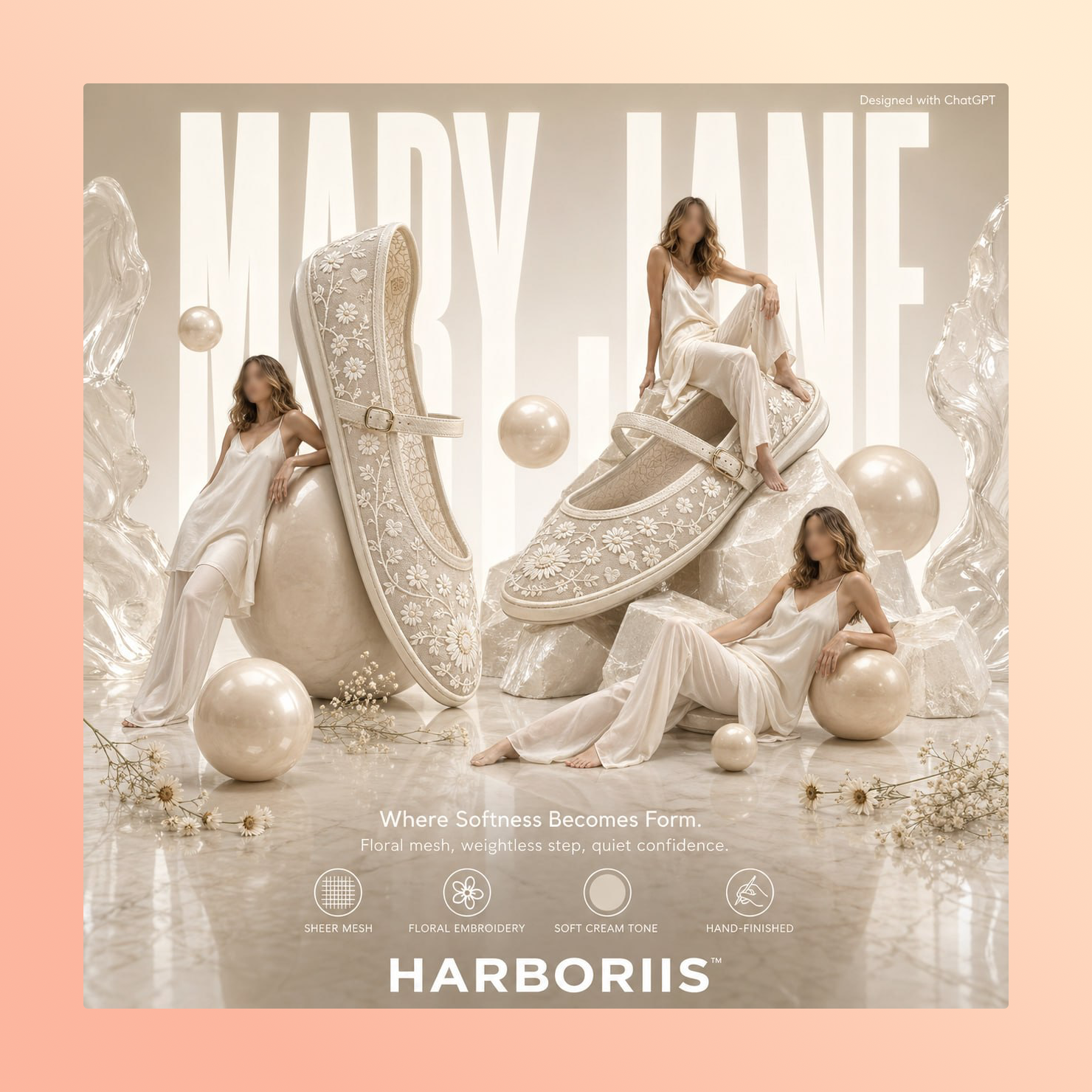
"tạo ảnh ads poster ecommerce" 单轮生成09最佳实践
运行此组合时最重要的 2 个建议:
- 简报越详细,agent 检索越精准。当用户只输入"红色狐狸"时,agent 会搜索
"red fox",返回各类无关模板(森林中的狐狸、卡通狐狸、写实狐狸……)。在简报中加入 形状(poster / infographic / portrait / ad……)、情绪(festive / moody / minimal……)和色调(red-gold / pastel / neon……)关键词,检索结果会更贴近意图。例如:"poster Tết cáo đỏ Việt Nam style infographic, palette đỏ-vàng festive" → agent 的搜索查询包含infographic festive red-gold,可过滤出匹配的模板。 - 不要将超时时间降低到 600s 以下。复杂图像生成(例如包含大量文字的信息图)服务器处理通常需要 4–8 分钟 — 这不是错误,是正常情况。旧的默认值
120s × 2 次重试经常中途被截断(context deadline exceeded)导致失败。PR #1002 将其改为600s × 1 次重试:等待时间更长但足够;仅重试 1 次,因为超时后重试成本翻倍,且很少成功。运营者可按需调整,但不要设低于 600s — 几乎必然重现旧错误。
10技术总结
文件参考
| 组件 | 文件 | 职责 |
|---|---|---|
| 原生图像接口 | internal/providers/native_image.go | 接口 NativeImageProvider、ValidateImageModel、SizeFromAspect |
| Codex 实现 | internal/providers/codex_native_image.go | 构建请求体,解析 JSON / SSE 响应 |
| 工具入口 | internal/tools/create_image.go | 工具分发、链解析、原生路径 |
| Provider 链 | internal/tools/media_provider_chain.go | 链超时 600s,max_retries 1 默认值 |
| PNG 嵌入(运行时) | internal/tools/png_embed.go | pngEmbedPrompt — 在 IEND 之前插入 "Description" tEXt chunk |
| PNG 嵌入(2 chunk) | internal/agent/png_metadata.go | EmbedPNGPrompt 2 chunk(Description + Software)— 暂未被 create_image 调用 |
| 工具过滤门控 | internal/agent/loop_tool_filter.go | 2 层门控:capability AND allowImageGeneration |
| Vision 路由 | internal/agent/media_tool_routing.go | hasReadImageProvider — 上传图像的文件引用 vs 内联模式 |
| 编排模式 | internal/agent/orchestration_mode.go | ModeTeam / ModeDelegate / ModeSpawn 按团队 + agent 链接解析 |
| 内置工具种子 | cmd/gateway_builtin_tools.go | 默认 Enabled: false + Requires 依赖(vision、image_gen 等) |
Skill 后端
Skill 通过 Dashboard 上传(参见 Section 07 · Step 4)。scripts/search.py 调用外部托管的语料库服务器;BM25 + tag boost 排序位于服务端,不属于 GoClaw 核心。